
 Reslota
Everything Reslota does for a cafe, from the first order to the owner's report.
Reslota is an AI-powered POS for cafes and restaurants in Pakistan. It takes orders at the counter, at the table, on WhatsApp and online; prints to the kitchen; settles bills and udhaar; keeps the drawer, the expenses and the stock; tells the owner where money leaks; and brings guests from the area with zero commission. Every feature on this page is live today.
From Rs 3,000 a month per cafe. No hardware, no charge per counter, no commission on any order.
No table. Family or single on the slip, so the kitchen packs it right, and the guest saved if they want to be.
Orders at the counter, at the table and on the way
Reslota is a restaurant and cafe POS that takes dine in, takeaway and delivery orders from any phone, tablet or laptop. Waiters order from their own phones, the kitchen gets a slip the moment a round is sent, and the till keeps working when the internet drops.
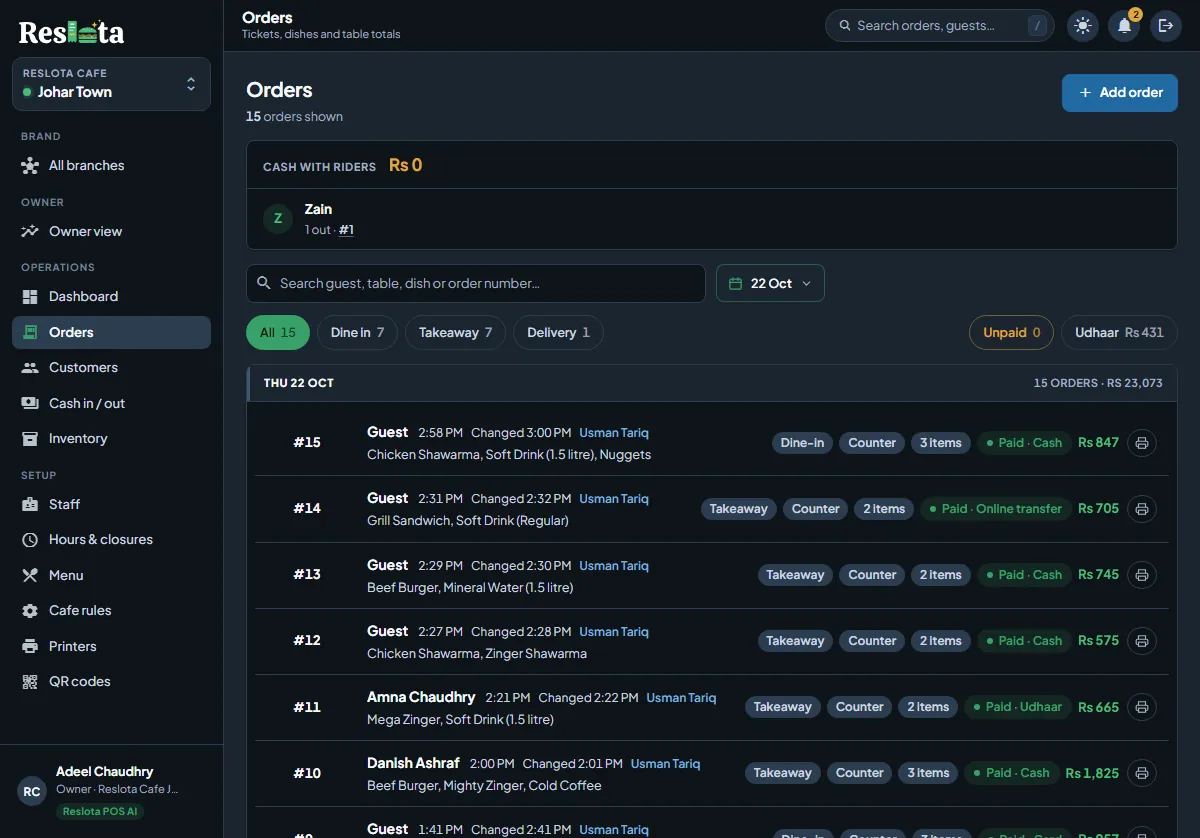
- Dine in, takeaway and delivery
- Every order is marked by how it is served, with a table or without one. A family's takeaway prints FAMILY in big letters under the order number so the kitchen packs it right.
- A waiter's phone is a till
- Each waiter signs in on their own phone, takes the order at the table and sends it. No handheld to buy, no charge per counter or per user.
- Tables that order in rounds
- A table orders more as the evening goes on. Each round goes to the kitchen as its own slip, and the bill grows with it until the guests ask for it.
- Sizes, options and deals
- Half and full, extra cheese, no onions, a deal made of several dishes with a choice inside it. The kitchen slip reads the options back exactly as they were taken.
- Order numbers that restart every morning
- Orders count the way a cafe counts them, from one each day, and a cafe that serves past midnight stays on the same day until it closes.
- Any ticket, months later
- Search by order number, guest, dish or date. Every change to a ticket is kept: what was added, what was taken off, and who did it.
- A dish called off, never quietly removed
- Once the kitchen has a dish, it can only be voided, with a reason and a name. An unpaid order is cancelled with a reason too, and the kitchen gets a cancellation slip.
- Keeps taking orders when the internet drops
- Mark one device as the till and it carries on through an outage: orders, slips and bills, with everything sent to the server the moment the connection is back.
Kitchen slips and bills on your own printers
Kitchen slips and bills print straight to the cafe's receipt printers through the Reslota Print Helper, a small app on a Windows computer or an Android phone at the cafe. No print dialog, from any phone or computer that is signed in, on 58 mm and 80 mm thermal printers and 76 mm impact printers.
- The slip prints the moment the order is sent
- Counter, waiter, QR, online and WhatsApp orders all reach the kitchen the same way: a slip on the kitchen printer, with the order number, the table or the guest, and every option.
- Fits the printer you already have
- Set how many characters your printer fits across and the slip is laid out for it. Thermal 58 mm and 80 mm, and 76 mm impact printers, over USB or the network.
- The Print Helper installs and updates itself
- Download it once on the computer that stays on while you are open. It starts with Windows, keeps itself up to date, and the Printers page shows when it is connected.
- Bills, printed or sent
- The itemised bill prints at the counter, and on the ordering plans it also goes to the guest's phone by WhatsApp and by SMS.
Bills, payments, discounts and udhaar
A bill in Reslota is itemised, carries the cafe's own charges, and is settled the way the guest pays: cash, card, bank transfer or udhaar on the guest's tab. Every discount has a reason and a name, and a paid bill can be corrected but never silently changed.
- Cash, card, transfer or udhaar
- Cash records what was handed over and the change given. Transfers record which bank or wallet. Udhaar goes on the guest's tab against their number.
- Your own charges, by kind of order
- A service charge on dine in, packaging on takeaway, delivery on delivery. Each charge applies only to the orders it belongs to, and the guest sees it on the bill before paying.
- Discounts with a reason
- In rupees or a percentage, for a reason from your own list, with the name of whoever gave it. The owner sees discounts by reason and by person.
- Udhaar that clears itself
- See who owes what, biggest first. When a regular pays, the money clears their oldest bill first, and a brand's guest can pay at any branch.
- Mistakes corrected, not hidden
- Correct a paid bill when it was paid another way or money was given back. A cash refund comes out of the open shift, and the correction keeps the original beside it.
Shifts, the drawer and the expense ledger
Reslota closes every shift with a blind count and keeps an expense ledger, so the owner knows what the day made, what the drawer should hold, what was spent and what is left after expenses. It is the hisaab kitab of the cafe, kept as the day happens.
- A blind count at close
- The shift opens with a float. At close, the cash is counted first and compared after, so the count is honest. Every cash in or out during the shift carries a reason.
- Expenses by category
- Gas, milk, rent, the electricity bill: expenses go into categories the owner sets. Bills paid outside the drawer are recorded too, so nothing spent is missed.
- Money out that is not spending
- An owner's share taken out, or change taken back, is counted apart from expenses, so profit is not understated by money that only moved.
- Staff see only their own cash
- Managers and below see and change only the cash they handled. Everyone else's entries appear as one line in the shift count, and only the owner sees the whole ledger.
- Staff pay from the drawer
- Salaries, weekly wages, advances and bonuses, paid out of the drawer and recorded against the person. Only the owner can remove a payment.
Stock, recipes and what each dish really costs
Every dish in Reslota has a recipe, so stock comes off the shelf as slips go to the kitchen and the food cost of each plate is known in rupees. Purchases, suppliers, batches made in house, waste and stock counts all go through the same inventory.
- Recipes take stock off the shelf
- A recipe for each dish and each size. When a slip goes to the kitchen, its ingredients come off the stock; when a dish is voided, the stock goes back or is counted as waste.
- Batches made in the cafe
- Sauces, doughs and marinades made in house have their own batch recipe. Make a batch and the ingredients come off; use it in dishes and it comes off too.
- Purchases and suppliers
- Record what was bought, from whom and at what price. Stock is valued at the average price you actually paid, so each dish's food cost is a real figure.
- Waste and counts
- Record what was thrown away and why. Count the shelf whenever you like, and the system shows what moved each item since the last count.
- Food cost against your target
- Every dish shows what it costs to make against what it sells for, with your own target food cost beside it, so a dish losing money is found before the month ends.
The owner's view: profit, leaks and the day on WhatsApp
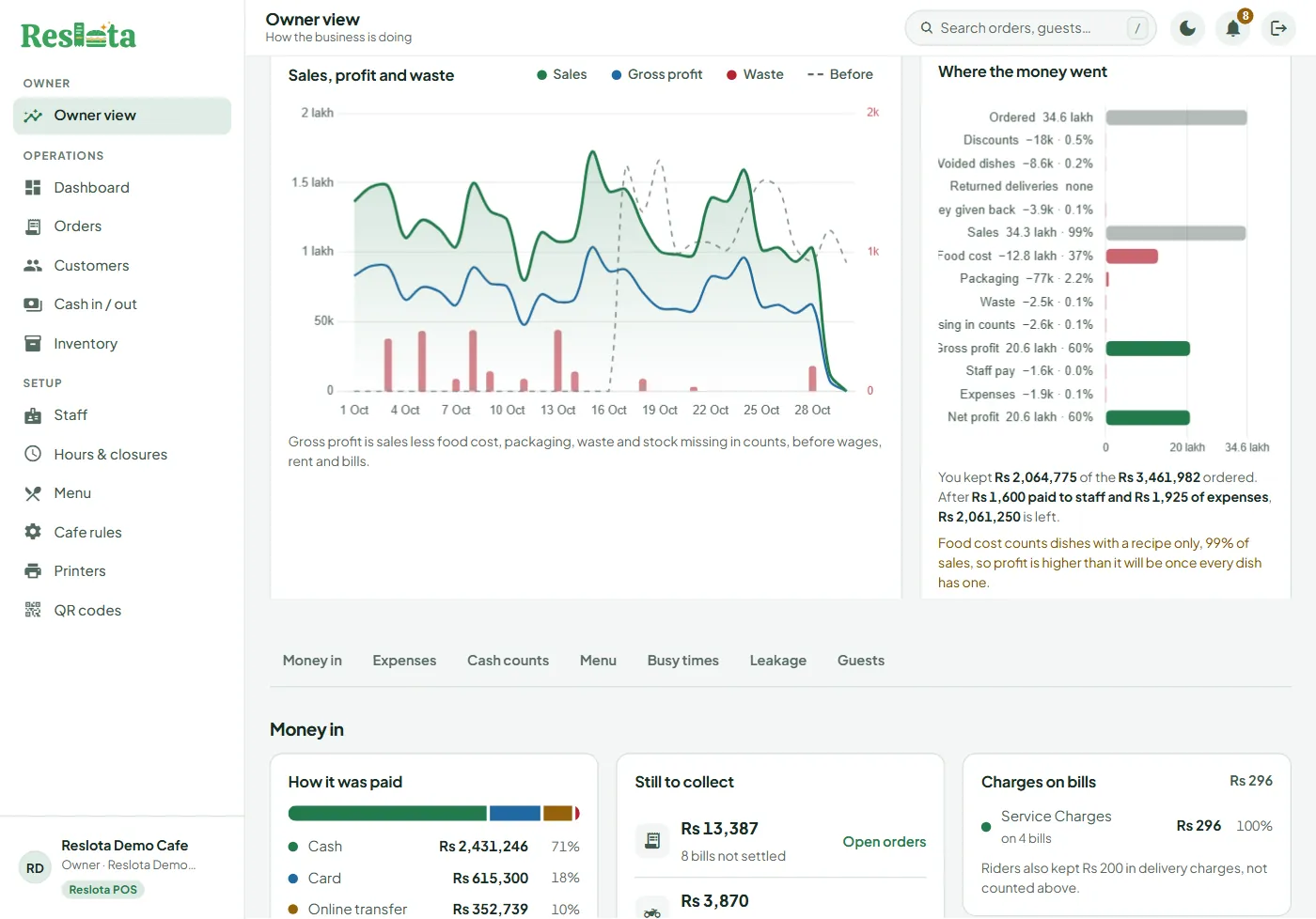
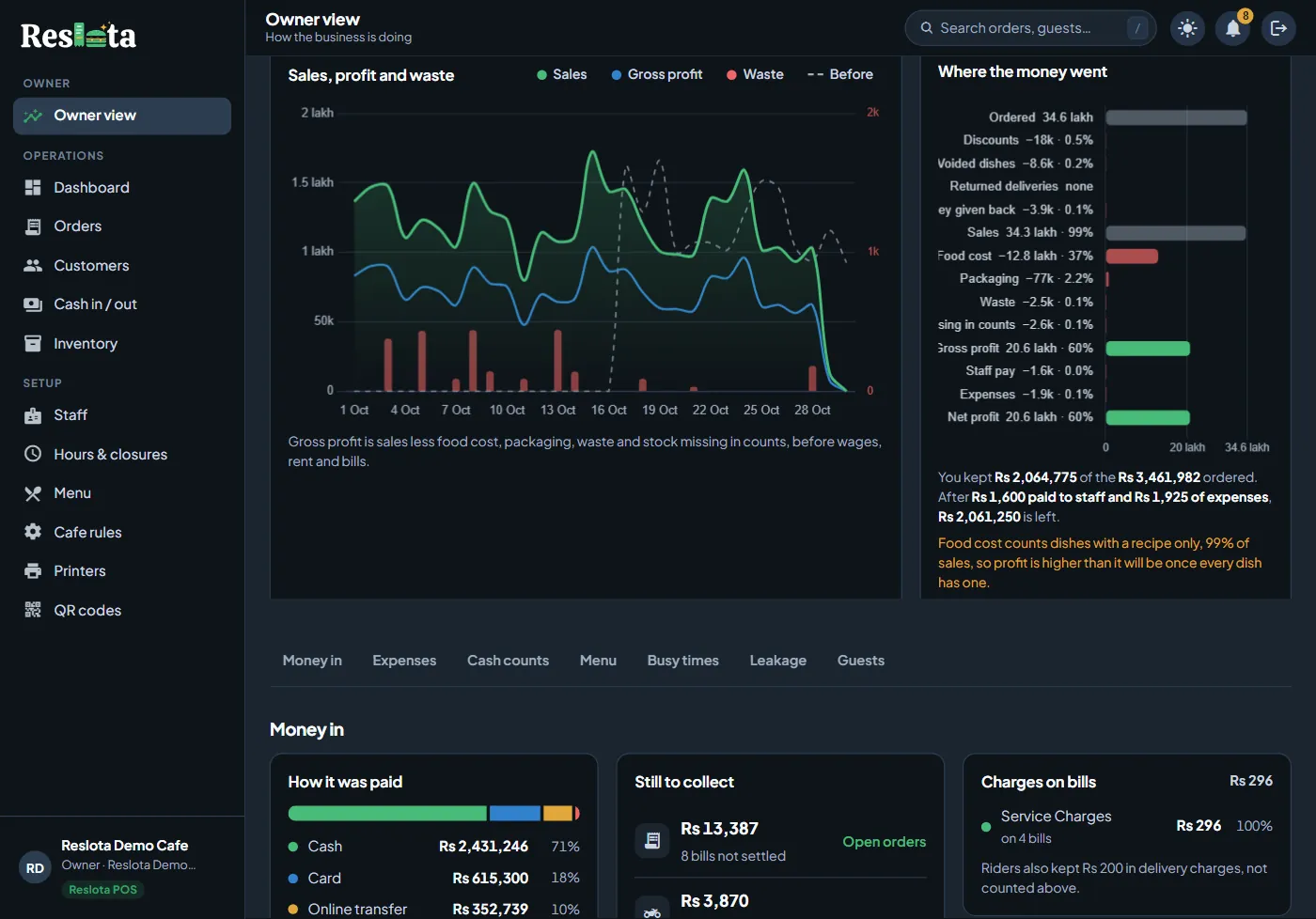
The Owner view in Reslota shows sales, gross profit, expenses and what is left, with every figure set against the period before. It names where money leaks: discounts, voided dishes, deliveries that came back, refunds, stock that counts found missing. Every evening the same figures reach the owner on WhatsApp.
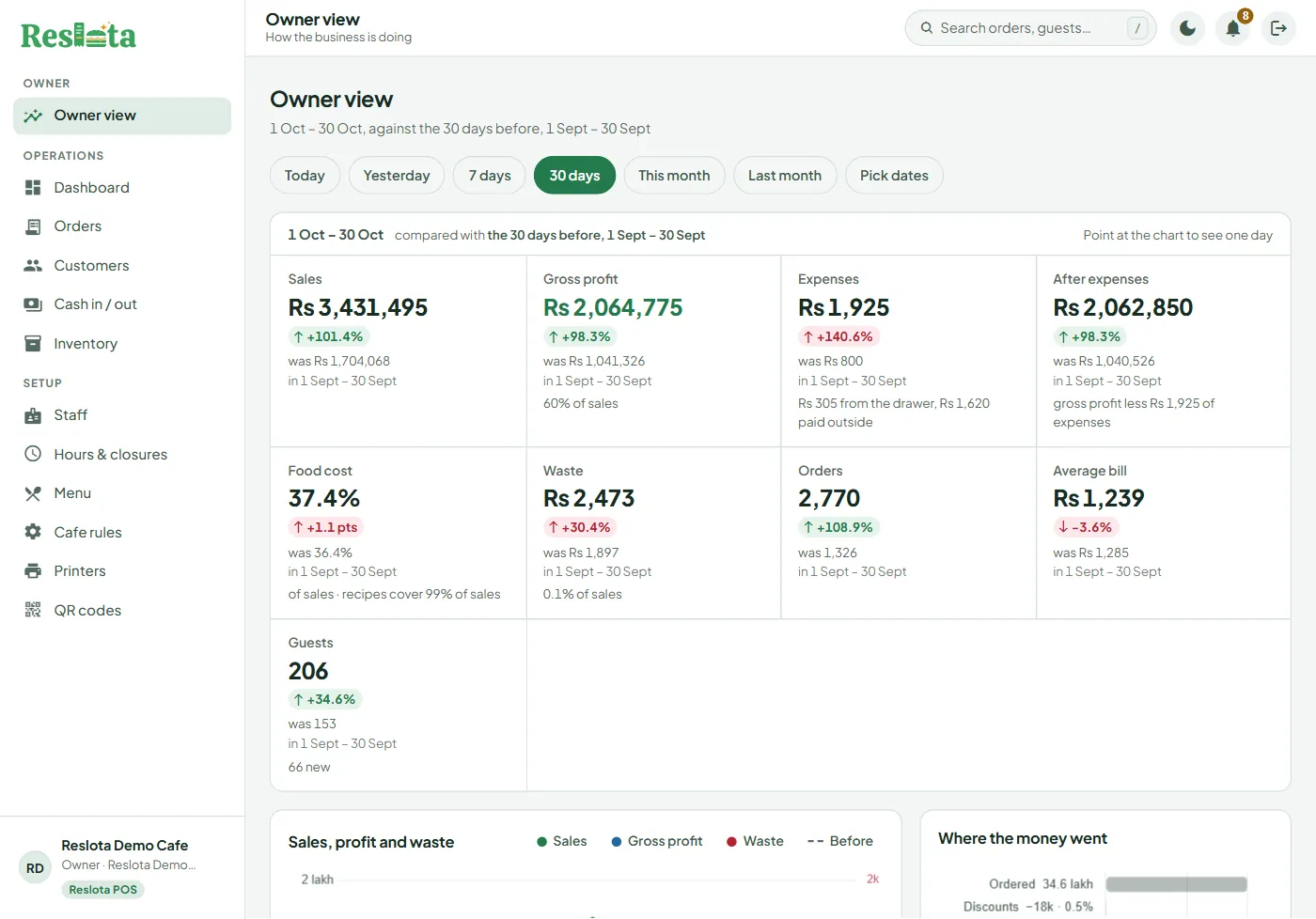
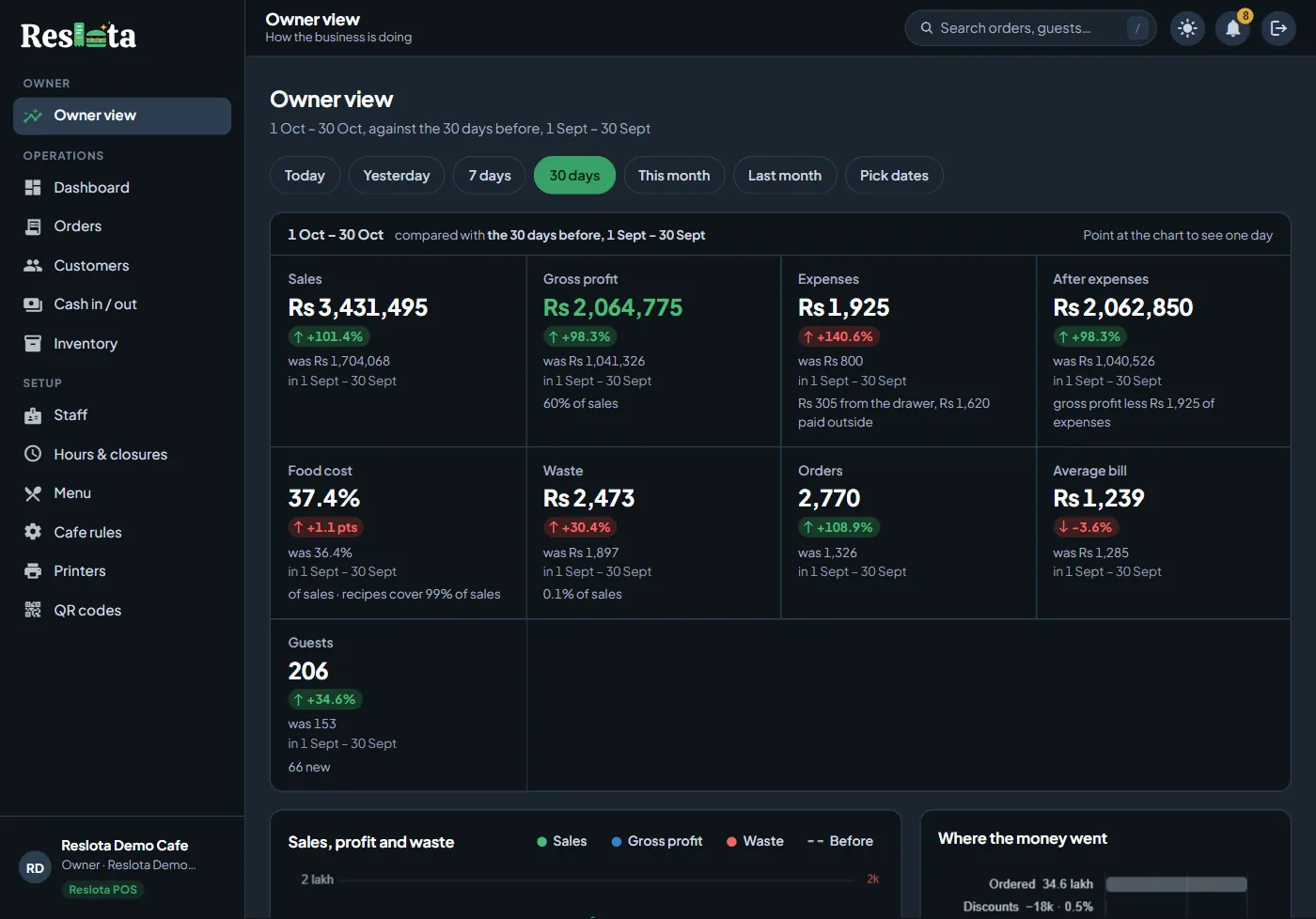
- Sales, profit and waste
- Takings, gross profit after food cost, expenses and net profit, for today, a week, a month or any dates, each against the period before.
- Money that did not reach the till
- Discounts given, dishes voided, deliveries that came back, money given back, orders cancelled and stock missing in counts, each in rupees, each against last time.
- What sells and what is wasted
- Best sellers, every dish sold, the most wasted, and the busiest days and hours, so the menu and the rota follow what actually happens.
- Guests, new and returning
- How many guests came for the first time, how many came back, who spends most, and what is still to collect in udhaar.
- The day, the week and the month on WhatsApp
- Every evening after closing, the owner gets the day: takings against the same day last week, how it was paid down to each bank, the orders, the drawer count and what staff were paid. The week arrives on Monday and the month on the first.
- Every number opens its orders
- A figure is never a dead end. Tap it and the orders, discounts or expenses behind it are listed, so a question about last Saturday is answered in seconds.
Staff, roles and who did what
Everyone at the cafe signs in as themselves. What a person sees follows their role, every order and delivery is credited to the person who took it, and staff pay is kept against each name.
- Roles that fit a cafe
- Owner, manager, receptionist, waiter and rider each see what their job needs. Chefs and kitchen staff can be on the payroll without a sign-in.
- Who took the order, who served the table
- Orders are credited to the waiter who took them, deliveries to the rider who carried them, so the Staff page shows how many each person handled in any period.
- Pay kept against the person
- Rates, salaries, weekly wages, advances and bonuses, with what has been paid this month, and the owner's view showing staff pay in the month's costs.
- Someone who leaves is marked, not deleted
- The orders they took keep their name, and their sign-in stops working the moment they are marked as left.
Your own ordering page and QR codes, with zero commission
Every cafe on Reslota gets its own ordering page and a QR code. Guests scan or tap, order from the same menu the till sells from, pay the menu price, and the order rings on the till. Reslota takes no commission on any order, ever.
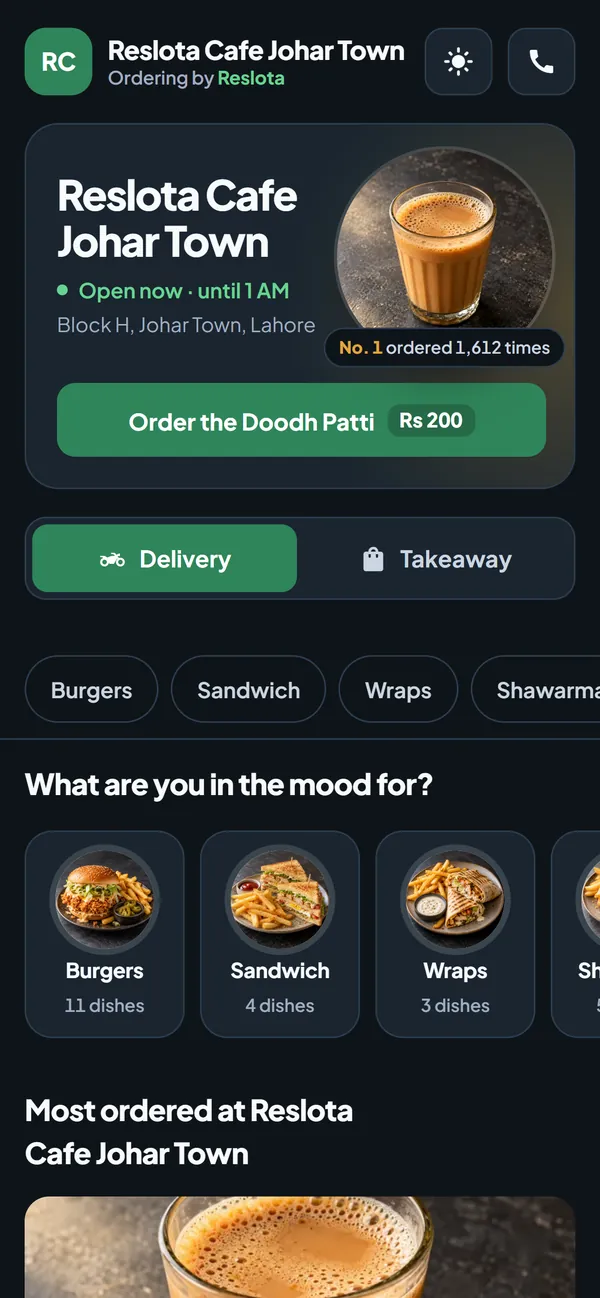
- A QR code for every table, the counter and your brochures
- One code does it all. Guests scan it, sign in once with a WhatsApp code and order from their phone. Dine in asks for the table number; the order goes to the kitchen like any other.
- Your link, your menu, your prices
- Photos, sizes, options, deals and the most ordered dish, the same menu as the till. Put the link in your WhatsApp replies, your Instagram bio and your Google listing.
- Delivery charged by the km
- The guest drops a pin on the map and the charge is worked out from the distance to your cafe, by your own rate per km or one flat amount. Paid cash on delivery.
- Online orders ring on the till and wait for you
- A web order rings on every panel screen until the desk accepts it. Accept prints the kitchen slip; decline asks a reason, which the guest sees with a button to call you.
- Guests track it themselves
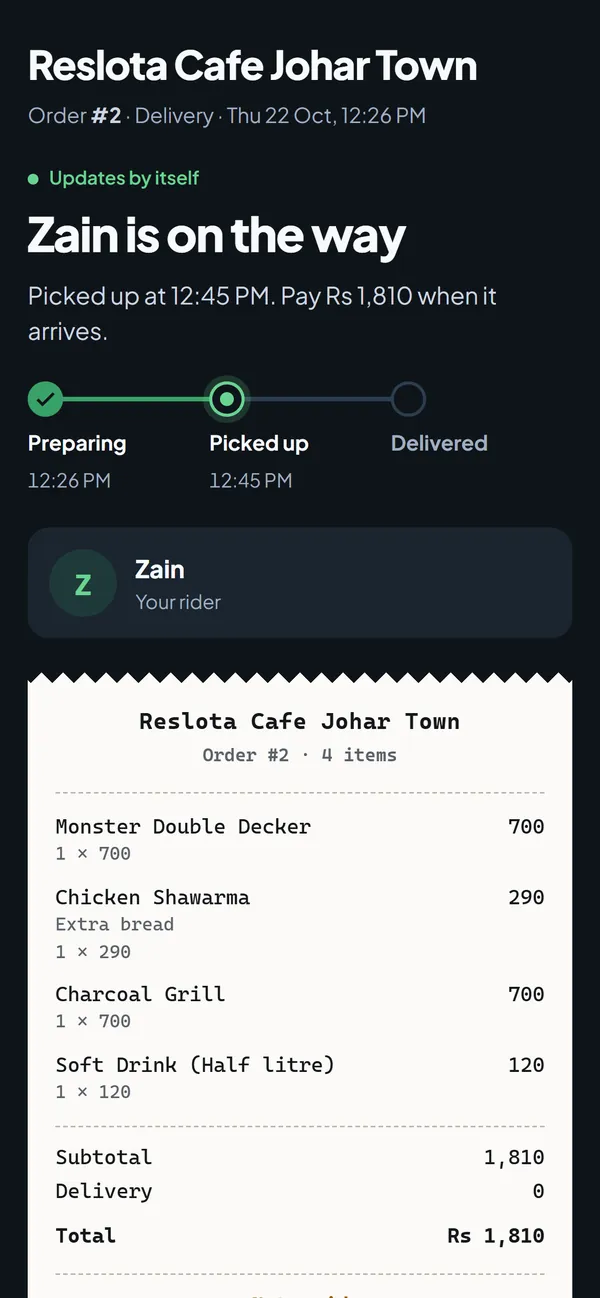
- Preparing, picked up and delivered, each with its time, the rider's name once they have it, the itemised bill, and a rating at the end. They stop calling to ask.
- Every online guest joins your guest book
- Name, number, saved addresses and what they ordered, kept against their number so the next order is faster and the owner sees who comes back.
The AI that answers your guests on WhatsApp
On the AI plans, Reslota answers the cafe's WhatsApp in English, Urdu and Roman Urdu, day and night: the menu, opening hours, location and delivery, and it takes orders in the chat. It answers only from what you set in Reslota, and hands over to a person when it should.
On Reslota POS AI and Reslota AI Pro, with your own WhatsApp number.
- Takes the order in the chat
- "2 zinger burger aur 1 large fries, delivery" is enough to start. The AI asks only for what is missing, confirms the bill, and the order lands on the till with the guest's name, number and address.
- Or sends your menu, one tap away
- Ask for the menu and the AI sends an Order now button that opens your ordering page on their phone, with their number already known.
- Answers the questions around the order
- What a dish comes with, whether you are open right now, where you are, whether you deliver to them. From your menu, your hours and your rules, never from the internet.
- In the guest's language
- English, Urdu and Roman Urdu, replying in whichever one the guest wrote in, in about nine seconds.
- A person when it should be a person
- A complaint, a special request or anything it cannot settle goes to your staff in the Inbox, with what was said so far. Your team replies as themselves and hands the chat back.
- Table bookings, for cafes that take them
- On Reslota AI Pro, guests book a table by writing normally. Real availability is checked before the AI confirms, a reminder goes an hour before, and a late guest is asked whether they are still coming.
More guests from your area, through Reslota
A cafe on Reslota is listed on Reslota's own ordering platform, where guests near it find cafes that are open now, browse dishes with photos and deals, and order direct at the menu price. The Reslota app for Android keeps the cafe's own staff told the moment something needs them.
- Listed where hungry people look
- Guests on reslota.app see the cafes that deliver to where they are or take pickup, sorted by open now and by distance, with your most ordered dishes and your deals in front.
- Your deals, in the carousel
- Every cafe's best deal takes its turn in the deals band, with its photo, its price and what is in it. A deal on your menu is a deal on the platform, with nothing extra to set up.
- Still your order, still zero commission
- An order from the platform rings on your till exactly like one from your own link. The guest pays your price, you deliver or hand it over, and you keep the whole bill.
- The Reslota app on every phone
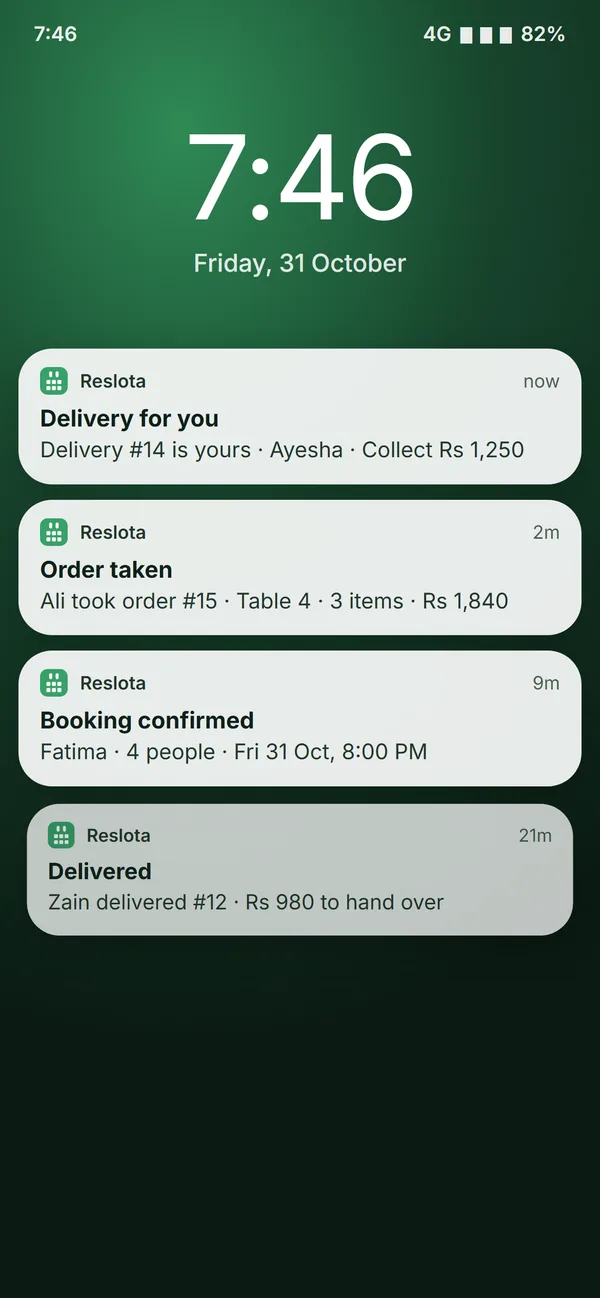
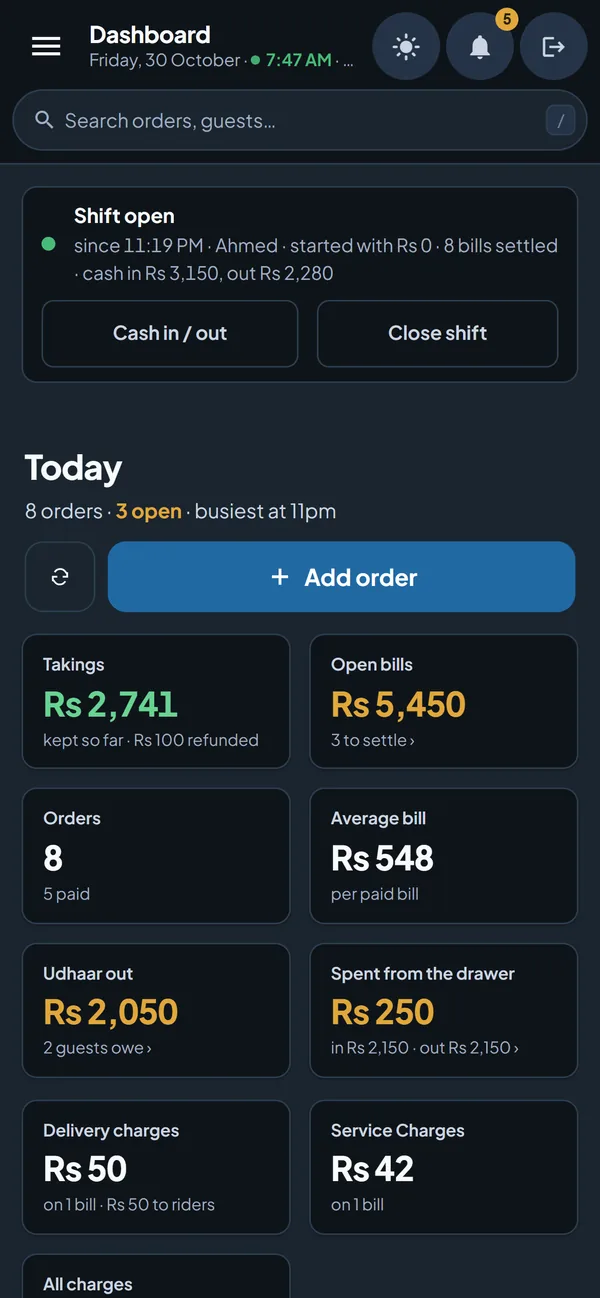
- A rider is told the moment a delivery is theirs and how much to collect. The desk hears about new orders, deliveries and bookings. The owner sees the day as it happens. Free for every member of staff, on Android 7 and up.
More than one branch, one Reslota
A brand with several branches runs them on one Reslota: one menu with the same prices everywhere, stock and costs kept per branch, the brand owner seeing every branch together or one at a time, and the brand's week and month arriving on WhatsApp.
- One menu, every branch
- The brand owner edits the menu once. A branch only marks what is sold out or not sold there, and managers never change a shared dish.
- Stock and costs per branch
- Recipes are shared, but purchases, stock, waste and counts belong to each branch, so each kitchen's food cost is its own.
- Guests across branches
- The brand owner's Customers screen lists every branch's guests, with orders at other branches shown apart, and udhaar collectable at any branch.
- Each branch its own WhatsApp
- Every branch answers its own number and prints its own slips. The owner gets each branch's day, and the brand's week and month.
Runs on what you already have
Reslota runs in the browser on any phone, tablet or laptop, in a light or dark theme, with nothing to buy and nothing to install at the counter. Set up takes a day: in person in Lahore, online everywhere else in Pakistan.
- No hardware to buy
- The till is a browser tab. Use the laptop, tablet or phone the cafe already has, and the receipt printer it already owns.
- Light or dark, per person
- Each member of staff picks their own theme, and the phone's status bar follows it in the app.
- Set up in a day
- We load your menu and your printers with you and put a real order through before we leave. In Lahore we come to the counter; elsewhere we do it on a call.
- One price per cafe
- Plans from Rs 3,000 a month per cafe, with no charge per counter, per user or per order. Reslota POS AI and Reslota AI Pro add WhatsApp ordering and the AI.
What cafes ask before they switch
Does Reslota work with my receipt printer?
Yes, with 58 mm and 80 mm thermal printers and 76 mm impact printers, over USB or the network. The Reslota Print Helper on a Windows computer or an Android phone at the cafe sends slips and bills straight to them.
Can waiters take orders on their own phones?
Yes. Each waiter signs in on their own phone, takes the order at the table and sends it to the kitchen. There is no charge per user or per counter.
Does Reslota track expenses and profit?
Yes. Expenses go into categories the owner sets, shifts close with a blind count, and the Owner view shows sales, gross profit, expenses and net profit against the period before. The day's figures also arrive on the owner's WhatsApp every evening.
How does Reslota find leaks?
The Owner view lists money that did not reach the till: discounts by reason and by who gave them, dishes voided, deliveries that came back, money given back, orders cancelled, and stock that counts found missing, each in rupees against last time.
Can guests order without downloading an app?
Yes. Guests scan the cafe's QR code or open its link in the browser, order from the menu at the menu price and track the order on one page. No app and no account to make.
Does the cafe pay a commission on online orders?
No. Orders from the cafe's own page, its QR code, WhatsApp and Reslota's ordering platform all come with zero commission. The cafe pays one monthly subscription for the POS.
Does the till work without internet?
Yes. Mark one device as the till and it keeps taking orders, printing slips and settling bills during an outage. Everything syncs when the connection is back.
Can I run more than one branch?
Yes. A brand runs its branches on one Reslota: one menu with the same prices, stock and costs per branch, every branch's guests in one place, and the brand's week and month on WhatsApp.
Is Reslota integrated with FBR or PRA?
Not yet. Tax invoicing is on the plan and nothing on this page claims it. Ask us before you sign if your cafe needs it now.
Which plan has the WhatsApp AI?
WhatsApp ordering and the AI answers are on Reslota POS AI and Reslota AI Pro. Table bookings with reminders are on Reslota AI Pro. Reslota POS is the counter, the kitchen, the bills, the drawer, the stock, the owner's view, the ordering page and the QR code.
Run your cafe on Reslota AI
Message us on WhatsApp. We load your menu and your printers with you and put a real order through before we leave.